
What’s gone?
Input encoding
Up until now, Contao has encoded input as soon as it is saved; for example, < was written to the database as <. From Contao 6.0 onwards, all data remains in its raw form in the database and is only encoded and masked when it is output.
For day-to-day work in the back end, this does not change anything for the time being. However, it does make a significant difference for development and when outputting data in templates. From now on, the context in which the data is processed determines whether it may be output 1:1 (raw) or not. For example, something classified as unsafe in an HTML template may be unproblematic – or even desirable – when passed to an external interface. Particularly with externally connected systems, it is preferable for data to arrive in its raw form rather than having to be laboriously converted first.
In Twig, encoding and escaping protect the data when it is output in templates. By default, Twig uses UTF-8 and escapes HTML output to prevent cross-site scripting (XSS). However, if the |raw filter is used, you must check the data arriving there, as the protection no longer applies and no unchecked data must be output. It is recommended to avoid raw wherever possible and instead use sanitize_html('contao') so that only safe HTML tags are allowed through.
Moritz explained this topic wonderfully using an example in his presentation on output encoding. Furthermore, in his recap of the first Contao Core Developers Meeting 2026, Yanick describes in detail why input encoding is a problem. Both are well worth reading if you want to delve deeper into the subject.
When updating to Contao 6.0, Contao automatically handles the database migration. However, it is important that you update from the latest version of Contao 5.7 and that you have completed all pending migrations there beforehand.
HTML5 templates
A logical consequence of this is that, due to the switch to output encoding, support for HTML5 templates has been discontinued. So, to be absolutely clear: the old template system has been completely removed; Contao 6.0 works exclusively with Twig. Any templates with the .html5 extension will no longer work. This applies not only to the core, but also to all extensions.
The fe_page page layout is still supported. From now on, you can use the Twig version fe_page.html.twig for this. The switch to the new Twig page layouts with slots is therefore not mandatory; it is entirely up to you.
Back end themes
It is no longer possible to have multiple back end themes in Contao 6.0. The previous "flexible" theme becomes the default, and the system/themes folder is no longer used. If you wish to customise and adapt the back end, you should use your custom CSS and include it via an entry in the config/config.yaml file.
# config/config.yaml
contao:
    backend:
        custom_css:
            - files/backend/custom.css
        custom_js:
            - files/backend/custom.js
In your custom CSS, you can, for example, define your own colours or a logo. See also docs.contao.org.
BBCode
The Comments bundle no longer supports BBCode. This used to allow you to format the comment text, for example. Contao automatically converts existing comments to plain text during the update, so you don’t need to make any manual changes.
A lot of old code is being phased out
Contao 6.0 essentially removes the code associated with the old HTML5 template engine and its templates. This means that over 30,000 lines of legacy code are being removed from the core. This also highlights just what a colossal undertaking the core team has been managing on their own up to now. With Twig, Contao is now relying on an industry standard instead.
Other features marked as “deprecated” in Contao 5 are largely retained in Contao 6, provided they are not related to input encoding. This code will not be removed until Contao 7. This decision gives extension developers more time to make the necessary adjustments.
What’s different?
As well as the features that have been removed, there are also some that have been adapted or optimised.
insert_tag_raw becomes insert_tag_html
The Twig filter insert_tag_raw is now called insert_tag_html. The old name still works, but is deprecated.
The filter is now pre-escaped, so a raw must be placed before it. So foo|insert_tag_raw|raw becomes foo|raw|insert_tag_html.
New file hash in DBAFS
Contao now calculates file hashes using xxh128 instead of md5. This is noticeably faster, particularly when dealing with large numbers of files. For the update, this means: synchronise the file system completely beforehand so that the migration can rebuild the hashes correctly.
File insert tag with VFS support
The insert tag {{file::*}} now works with the virtual file system. This means it accesses the same level of abstraction as the rest of Contao and benefits from the additional capabilities.
In this context, all file handling has been migrated to the VFS. If you use the file insert tag or the download or video element for a file in the files directory that is not public, Contao now generates temporary URLs to the restricted files. This allows restricted files to be embedded directly for logged-in members, rather than simply being offered as downloads. For example, you can now stream a video from a restricted directory instead of simply making it available for download.
CSS classes for form fields
Contao now only applies custom CSS classes for form fields to the enclosing wrapper, and no longer applies them to each individual field within it. Please check your CSS in this regard if you have previously relied on the class being applied directly to the field.
Model values provide the default
If a value is missing, the model now returns the default value from the column definition instead of null. Furthermore, Contao casts the values to the database column type. This ensures more reliable return values and reduces the need for special handling in your own code.
Virtual fields
In addition to actual database fields, Contao has also supported virtual fields since version 5.7. The reason for this is a practical one: MySQL limits the row size per table. Anyone using a large number of extensions has previously hit this limit (keyword: "Row size too large") and been unable to create any further fields. With virtual fields, this no longer happens.
In Contao 6.0, the core itself now uses virtual fields for the first time for the video player element. For development purposes, the core also introduces a new AbstractColumnToVirtualMigration, which can be used to convert custom fields into virtual fields.
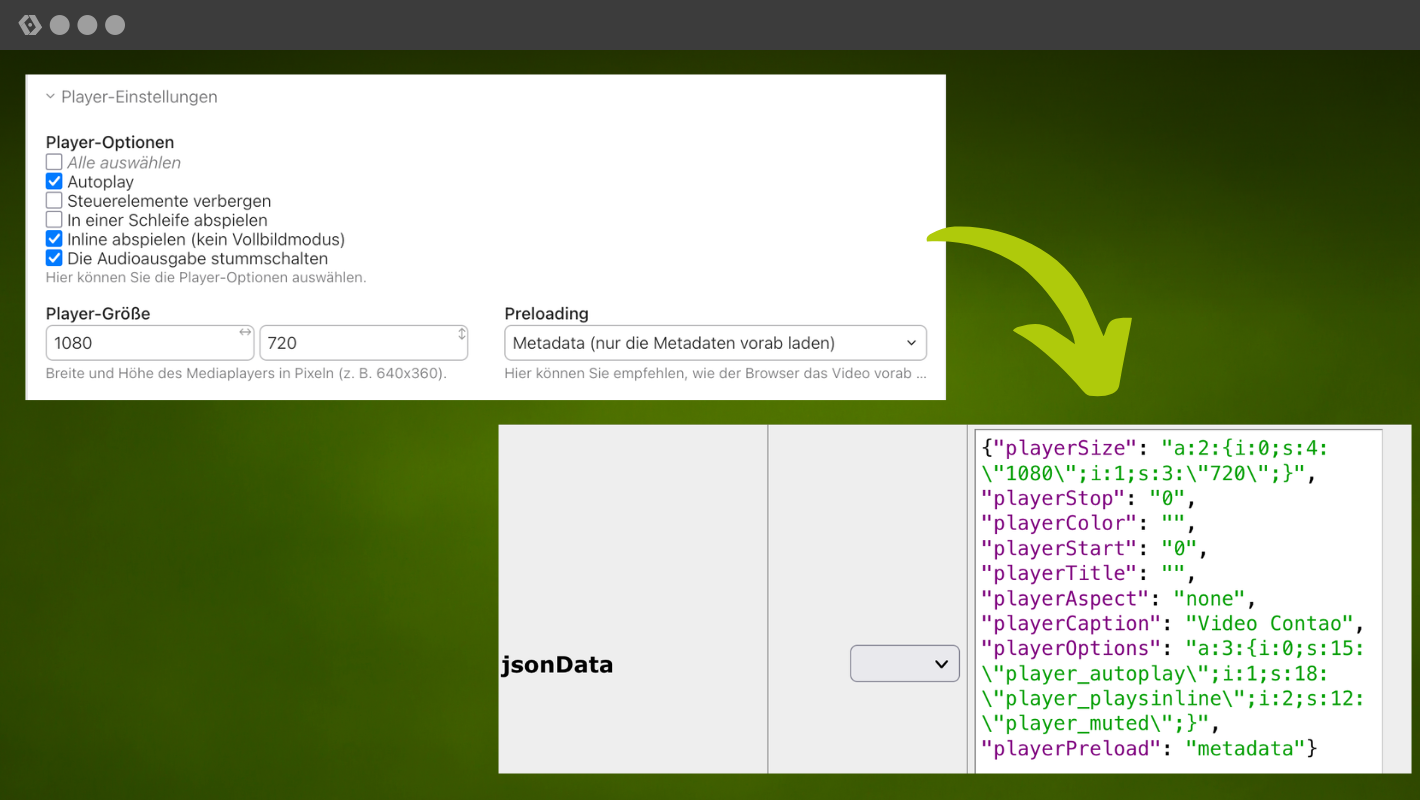
If you’d like to find out more about how virtual fields work, have a read of this section in the manual: docs.contao.org.
New features
As mentioned at the start, a major version release tends to focus less on new features. A few have been added nonetheless.
JSON-LD type for news items
For each news archive, you can now specify which JSON-LD type the posts should be assigned, for example NewsArticle. You’ll find this setting in the news archive’s advanced settings. The following options are currently available: NewsArticle, BlogPosting, Article. This enables search engines to categorise your content more accurately, which can have a positive effect on how it appears in search results.
Primary-Page-Image
In the page settings, you can now set a page image. Contao writes this image as primaryImageOfPage in the page’s JSON-LD data. This allows you to specify which image search engines should associate with the page. The image can now also be displayed in the Contao search results in the same way as the news image.
Incidentally, the image can also be used in the frontend if required, for example as a header image. To do this, add the relevant output to your Twig template. You can access it via contao.page.primaryImage. You can then use this to generate the image in the template:
{% set myimage = figure(contao.page.primaryImage|default, [1200, 500, 'crop']) %}

{% if myimage %}
    <div class="primary-image">
        {% with {figure: myimage} %}{{ block('figure_component') }}{% endwith %}
    </div>
{% endif %}
Insert into Nested Elements
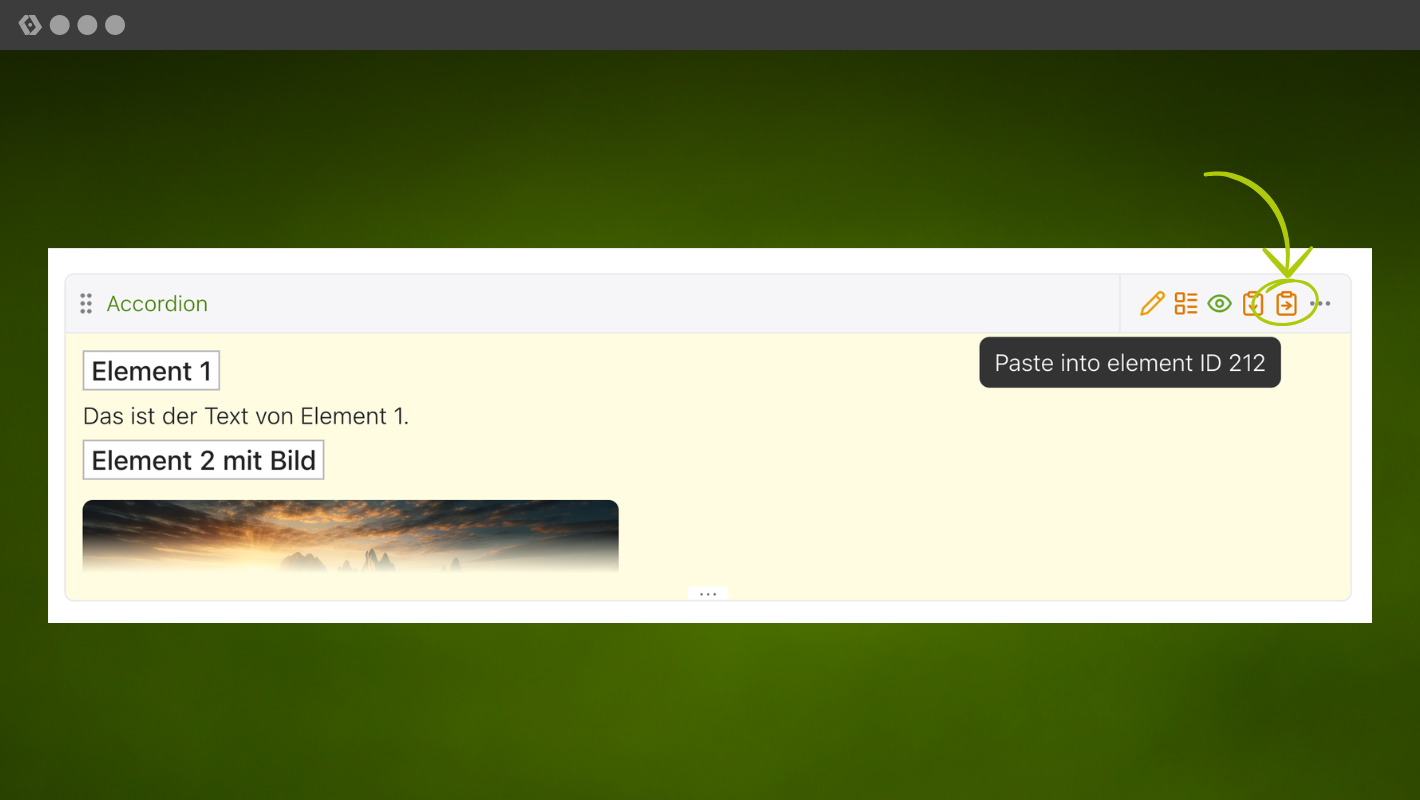
You can now insert content elements directly into nested elements without first opening the element’s child view. This saves you a few clicks in the back end.
Simple-Token-Filter
With the new Twig filters simple_token and simple_token_html, Simple tokens are now replaced correctly in Twig templates. You can use Simple tokens in your newsletter, for example. You can find out more in the manual.
Dependencies
Before you update, do take a look at the technical requirements for Contao 6.0:
- PHP: 8.4+
- Symfony: 7.4 and 8
- Monolog: 3
- Doctrine DBAL: 4.4+
- Doctrine ORM: 3.6
The update to Contao 6.0
If you want to update directly to Contao 6.0 now, there are a few important points you should bear in mind. I’ve already mentioned a few of these in the article, but here’s a summary of what you absolutely must pay attention to.
- Update from the latest Contao 5.7.x version. The database migrations are based on this. So first update to the latest 5.7 version and only then switch to 6.0.
- Run
contao:filesyncbeforehand. The file hash changes to `xxh128`. So in Contao 5.7, you must synchronise the file system. After the update, carry out another synchronisation straight away. - Convert all templates to Twig. The HTML5 templates will no longer work after the update. Switching to Twig is therefore mandatory. It’s best to carry out this work in good time whilst still on Contao 5.7.
- Read the UPGRADE.md file. It provides a comprehensive list of all changes and is essential reading for a major version update.
As always, remember to create a full backup before the update and ideally work on a copy!
We will publish a complete, detailed step-by-step guide for updating from Contao 5 to Contao 6 again with the next LTS version, Contao 6.3.
Should I upgrade now?
For most installations, we recommend waiting a little longer. It’s better to first ensure your installations are fully up to date with Contao 5.7 and to migrate all templates to Twig. This will allow you to complete the bulk of the groundwork whilst remaining on an LTS version with support until 2030.
What’s more, very few extensions have been released for Contao 6 so far. The extension developers also need to adapt their packages to the new encoding and to Twig first. As always, you can help by submitting pull requests where appropriate or by providing financial support.
Further information
The official release post on contao.org is also worth a read, and the Contao Academy’s YouTube video is well worth watching.
trakked is compatible with Contao 6.0
As usual, all the familiar features are available to you in trakked for Contao 6.0.
Changelog of the fixed issues in Contao 6.0.0:
-
#10144
Support
allowHtmlon only thecaptionfield in the meta wizard ( zoglo ) - #10152 Skip JSON values in the output encoding migration ( ausi )
- #10148 Remove redundant entity decoding ( Toflar )
-
#10143
Remove usage of the obsolete
$strTagEnding( ausi ) - #10141 Fix double encoded values in the calendar and news bundle ( zoglo )
-
#10133
Move the
backendWidthfield into the back end settings ( zoglo ) - #10114 Do not double encode the page title and description ( ausi )
-
#10099
Do not deprecate
Input::get()for dynamic URL parameters likeauto_item( ausi ) - #10096 Use the existing close and chevron icons in the form stylesheets ( leofeyer )
-
#10098
Replace the
doctrine/ormconflict withsymfony/doctrine-bridge( ausi )
Changelog of the fixed issues in Contao 6.0.0-RC2:
-
#10092
Replace the remaining
|insert_tag_rawwith|insert_tag_html( leofeyer ) - #10087 Use the "correct" TinyMCE package ( leofeyer )
- #10085 Upgrade to ALTCHA v3 ( leofeyer )
- #10082 Ensure a minimum stroke width for SVG icons ( leofeyer )
-
#10056
Add
insert_tag_rawto theUPGRADE.mdfile ( ausi ) -
#10069
Store the page name in the
HtmlHeadBagand use it in the breadcrumbs module ( ausi ) -
#10066
Increase the size of
tl_log.browser( ausi ) - #10042 Use a higher priority for the output encoding migration ( zoglo )
-
#10041
Use a Twig template for the
{{news::*}},{{event::*}}and{{faq::*}}insert tag ( ausi ) -
#10038
Deprecate the obsolete
HtmlDecoder::inputEncodedToPlainText()method ( ausi ) -
#10037
Rename the
insert_tag_rawTwig filter toinsert_tag_html( ausi ) -
#10035
Drop
ChunkedTextand pre-escapeinsert_tag_rawinstead ( ausi ) -
#10032
Fix the permission check of the
pasteintooperation ( lukasbableck ) - #10034 Fix output encoding in insert tags, newsletters and templates ( ausi )
Changelog of the new features in Contao 6.0.0-RC1:
- #10018 Add a reusable "column to virtual" migration ( leofeyer )
- #9584 Improve the UX of the tooltip controller ( zoglo )
- #10013 Return the default values from the schema in models ( ausi )
-
#9999
Add ARIA labels where there is no
<label>element ( leofeyer ) - #9983 Allow Symfony 8 ( Toflar )
-
#10001
Remove the deprecated
Backend.Themescripts that already have Stimulus alternatives ( zoglo ) - #9992 Add a simple token filter for Twig ( ausi )
-
#8349
Add a "paste into" operation to the
DC_Tableparent view ( lukasbableck ) - #9548 Remove the legacy migrations from the Stimulus controllers ( zoglo )
- #9540 Remove the deprecations from the calendar bundle ( zoglo )
- #9981 Only add custom form field classes to the outer container ( leofeyer )
- #9565 Allow adding a primary image to a page and use it in the JSON-LD ( lukasbableck )
- #9962 Remove the deprecated child record callback ( ausi )
-
#9944
Deprecate
Input::get('language')( ausi ) - #9947 Remove obsolete widget attributes ( ausi )
- #9557 Add the output encoding migration ( ausi )
- #9576 Add an option to change news JSON-LD type ( lukasbableck )
- #9946 Convert basic entities to Unicode for non-HTML fields ( ausi )
-
#9945
Remove the
Input::setPost()usages ( ausi ) -
#9943
Remove
Input::setGet()fromDC_Table( ausi ) -
#9942
Deprecate most methods of the
Inputclass ( ausi ) -
#9930
Do not include country codes in
tl_member.language( ausi ) -
#9941
Do not use
Input::setGet()in the search module ( ausi ) - #9938 Enable double encoding ( ausi )
-
#7430
Replace more
$GLOBALS['objPage']with the page finder service ( leofeyer ) -
#7014
Replace
$GLOBALS['objPage']with the page finder ( leofeyer ) -
#9582
Use the
manifest.jsonfile in theImage::getHtml()method ( zoglo ) -
#9534
Deprecate extending from
Module,ContentElementandHybrid( Toflar ) - #9541 Remove the deprecations from the comments bundle ( zoglo )
- #9542 Remove the deprecations from the FAQ bundle ( zoglo )
- #9543 Remove the deprecations from the manager bundle ( zoglo )
- #9544 Remove the deprecations from the news bundle ( zoglo )
- #9545 Remove the deprecations from the newsletter bundle ( zoglo )
-
#9572
Remove the deprecated
customSchemaOptionssupport ( fritzmg ) -
#9577
Implement a proper
{{file::*}}insert tag based on the VFS ( Toflar ) -
#9551
Rename the user templates namespace to
@Contao_User( m-vo ) -
#9536
Drop the deprecated
FilterPageTypeEventservice ( Toflar ) -
#9599
Rename
var/logstovar/log( leofeyer ) - #9566 Remove the Symfony bundle templates ( m-vo )
- #9546 Remove the bundle migrations ( zoglo )
- #9556 Remove Swift Mailer support ( bytehead )
-
#9558
Drop support for
doctrine/dbalv3 ( Toflar ) -
#9535
Drop the deprecated
EntityCacheTagsservice ( Toflar ) - #9533 Add VFS public Uri handling capability to the player ( fritzmg )
- #9498 Rework the public file handling in the VFS ( Toflar )
-
#9524
Drop the
RenderPageEvent( Toflar ) -
#9505
Remove input encoding in the
Widgetclass ( ausi ) -
#9485
Move the
flexibletheme into the build chain ( zoglo ) - #9484 Remove the legacy template system ( m-vo )
- #9332 Use PHP native lazy objects ( fritzmg )
- #9414 Change all SQL definitions to array notation ( fritzmg )
- #9482 Remove merging legacy headers ( Toflar )
- #9480 Remove the global request token for templates ( aschempp )
- #9483 Drop the deprecated message priority interfaces ( Toflar )
- #9479 Remove support for service annotations ( aschempp )
Changelog of the fixed issues in Contao 6.0.0-RC1:
-
#10030
Replace the remaining
Inputusages ( ausi ) - #10029 Encode user properties in the backend header menu ( ausi )
-
#10027
Update the
DEPRECATED.mdandUPGRADE.md( leofeyer ) - #10023 Stop using the deprecated Doctrine DBAL methods ( leofeyer )
-
#10022
Remove the
generate()method from frontend form widgets ( ausi ) - #10020 Add more output encoding ( ausi )
-
#10021
Remove unused
Backendmethods ( ausi ) -
#10019
Do not return
nullfor non-null columns in models ( ausi ) -
#10006
Remove the
Inputclass from theDcaUrlAnalyzer, operations, the palette builder, and several listeners ( ausi ) - #9997 Autolink URLs in comments and make them plain text ( ausi )
- #9977 Change "Contao 6" to "Contao 7" in the deprecation messages ( leofeyer )
- #9988 Remove old configuration nodes deprecated since Contao 4 ( leofeyer )
-
#9989
Wrap the active breadcrumb item in
<strong>tags ( leofeyer ) - #9994 Remove BBCode ( ausi )
- #9990 Move to a newer DBAFS hashing algorithm ( m-vo )
- #9986 Prevent changing the password in the "personal data" module ( leofeyer )
-
#9987
Deprecate
$strIpin user classes ( fritzmg ) -
#9980
Generate the form data XML file using
DOMDocument( leofeyer ) -
#9979
Remove the setters from the
RecordLabelclass ( ausi ) - #9969 Encode and sanitize widgets and options ( ausi )
-
#9966
Add a
RecordLabelobject for the label callback ( ausi ) - #9974 Ensure that ampersands in URLs are correctly encoded ( leofeyer )
- #9968 Do not encode ampersands in the back button URL ( leofeyer )
-
#9965
Use
findById()instead ofgetRelated()( leofeyer ) - #9967 Encode labels in the "show" modal ( ausi )
- #9963 Encode the group header in the parent view ( ausi )
- #9952 Correctly encode the content label ( ausi )
- #9954 Properly encode member group labels ( ausi )
-
#9892
Fix the missing
$objPageinFrontendTemplate::setCacheHeaders( aschempp ) - #9628 Use a delegate template when rendering Twig components ( m-vo )
-
#9578
Fix the
FigureRendererdefault template ( m-vo ) -
#9568
Remove all usages of
StringUtil::ampersand()( m-vo ) - #9506 Use the response context to generate the nonce ( bytehead )
- #9497 Increase the minimum Doctrine ORM version ( fritzmg )
About Contao 6.0
The first stable version of Contao 6.0 has been released on 26 August 2026 and will be the successor to Contao 5.7. 6.0 will be updated until 14 February 2027, after which it will be replaced by Contao 6.1.